The Sonoff ZBBridge is an operational paradox. It promises the convenience of a plug-and-play Zigbee gateway for the masses, yet it consistently fails as the network scales beyond a dozen nodes, often exhibiting persistent WiFi and pairing issues akin to other smart home bridges. If your bridge is dropping connections, it isn’t necessarily "broken"—it is hitting the hard limits of its ESP8266 architecture, coupled with a poorly optimized firmware implementation and the chaotic reality of 2.4GHz spectrum interference. To stabilize your Zigbee mesh, you must move beyond the stock eWeLink ecosystem and treat the ZBBridge as what it truly is: a budget-tier hardware platform requiring serious firmware intervention.
The Anatomy of Failure: Why the ZBBridge Architecture Stumbles
The Sonoff ZBBridge relies on a two-tier architecture: an ESP8266 Wi-Fi chip that acts as a bridge to your router, and a Silicon Labs EFR32 (usually the EFR32MG21 series) Zigbee radio. The failure point almost never lies in the radio itself; it lies in the serial communication bridge between the ESP and the Zigbee SoC. When you experience "connection drops," you aren't actually losing the mesh; you are losing the heartbeat between the gateway's Wi-Fi component and your automation controller (like Home Assistant), similar to how a Samsung SmartThings Hub V3 might go offline with persistent sync issues.

When the bridge enters a "not connected" state, it’s usually because the internal buffer is overflowing or the watchdog timer is resetting the ESP8266 due to memory exhaustion. If you are using the official eWeLink firmware, you are essentially at the mercy of their cloud-polling frequency and their poorly optimized MQTT keep-alive packets.
Beyond the Hype: The Case for Tasmota and Zigbee2MQTT
If you’re still running the stock firmware, stop. The industry consensus—supported by countless threads on the Home Assistant community forums and GitHub repositories—is that the stock implementation is fragile.
By flashing the ZBBridge with Tasmota, you strip away the bloatware and replace the communication layer with a lean, efficient protocol. When paired with Zigbee2MQTT, the gateway stops trying to "think" and starts acting as a transparent pipe, passing raw Zigbee traffic directly to your controller. This is the only way to achieve genuine network stability.
Why the "stock" experience is a lie:
- Latency Spikes: The cloud round-trip causes a "command-ack" lag that makes the bridge look offline.
- Buffer Bloat: Excessive Zigbee traffic from battery-powered sensors (like motion detectors or contact switches) floods the serial buffer between the two chips.
- IP Conflicts: The DHCP renewal process on the ESP8266 frequently causes a microscopic disconnect that the ZBBridge’s firmware fails to recover from gracefully.
The Role of Zigbee Interference and Channel Congestion
Even with perfect firmware, a ZBBridge will fail if it's placed next to your Wi-Fi router. I have seen hundreds of users complain about "random dropouts" that were solved simply by moving the bridge three feet away from an access point. Zigbee operates on the 2.4GHz spectrum, the same as 802.11b/g/n Wi-Fi.
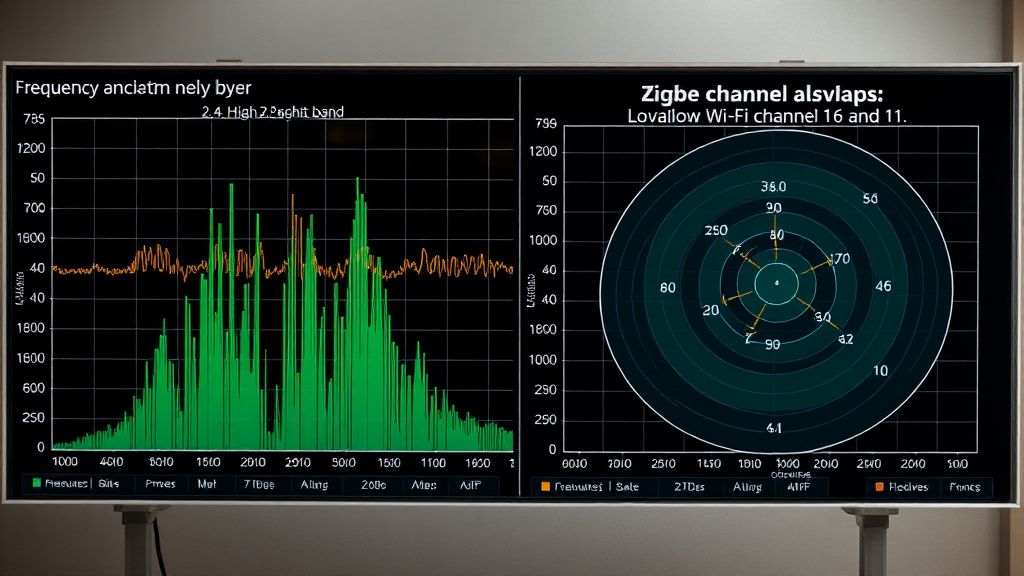
If your Wi-Fi is on channel 6 and your Zigbee is on channel 11, you have a collision zone. You must manually force your Zigbee network to channel 25 or 26. This is the "hidden" fix that most manuals conveniently ignore because changing channels requires a full re-pairing of every single device in your house. It’s painful, but it is the difference between a "solid" mesh and one that drops nodes whenever your microwave runs.
Real Field Reports: The "Ghost Device" Phenomenon
Let’s talk about the reality of the field. A user in a Reddit thread once described a "Ghost Device" scenario: their ZBBridge would report a light as "offline" while it was perfectly reachable via another router (mains-powered bulb) in the mesh.
The issue here is the Zigbee Routing Table. When the ZBBridge gets overwhelmed, it fails to update the neighbor table correctly. It thinks a device is dead because it didn't get an ACK, but the device is actually fine. This is a classic "stale routing" issue.
- The Lesson: Never use the ZBBridge as your sole router. You must have mains-powered Zigbee devices (plugs, bulbs, in-wall relays) that act as permanent routers to handle the load. If you rely on the bridge to talk to a battery-powered sensor on the other side of a brick wall, you are asking for a disconnect.
Engineering Compromise: Why Manufacturers Skip the LNA
The hardware design of the ZBBridge is cheap for a reason. It lacks high-quality Low Noise Amplifiers (LNAs) for the Zigbee radio. In a crowded suburban environment where you have 30 neighbor Wi-Fi signals hitting your walls, the ZBBridge’s radio is effectively "deaf."
If you are technically proficient, the most effective workaround isn't just firmware—it's antenna modification. I’ve seen technicians solder U.FL connectors to the PCB to attach external high-gain antennas. This isn't for the faint of heart, but it turns a "budget paperweight" into a capable gateway that can penetrate two floors of steel-reinforced concrete.
The "Migration Chaos" Problem
Users often ask: "Can I just swap the bridge without re-pairing?" The answer is a hard no. Zigbee networks are cryptographically tied to the network key of the coordinator. If you are migrating away from a dying ZBBridge to a more robust coordinator (like an SLZB-06 or a ConBee II), you are essentially starting from scratch.

The industry struggle here is the lack of a universal backup/restore standard. You’ll find "guides" on how to migrate your IEEE address to a new coordinator, but they are prone to failure and often result in an unstable state where the mesh never fully repairs itself. My advice: rip off the band-aid. Re-pair your devices properly rather than trying to perform "open-heart surgery" on the network database.
Counter-Criticism: Is the ZBBridge even worth it?
There is a vocal segment of the automation community that argues: Why bother? Why spend hours soldering, flashing, and channel-tuning a $20 device that has inherently mediocre hardware?
The critics are right. If you have the budget, move to a PoE-based coordinator (Power-over-Ethernet). The shift from Wi-Fi-based bridges to Ethernet-based coordinators is the single biggest "upgrade" you can make to your smart home. Wi-Fi is inherently bursty and jitter-prone. Ethernet provides the stable, low-latency backhaul that a Zigbee mesh actually requires to survive long-term. Using a ZBBridge today is a legacy choice—it works, but it requires constant vigilance.
Troubleshooting Workflow for Connection Drops
If your ZBBridge is currently failing, follow this diagnostic path:
- Check the Logs: Are you seeing "Zigbee2MQTT failed to connect to the bridge"? This is a network issue. If you see "Device not found in routing table," this is a mesh/interference issue.
- Power Supply Audit: Do not use the power adapter that came in the box. Those 5V/1A blocks are often noise-heavy. Use a high-quality, regulated 5V/2A power supply to ensure the ESP8266 isn't browning out during high-traffic moments.
- The "Isolation" Test: Unplug your Wi-Fi router for 5 minutes. Does the bridge stabilize? If yes, your 2.4GHz interference is the root cause.
- Firmware Verify: Ensure you are on the latest Tasmota release. Older versions of the ZBBridge-specific builds have memory leaks that manifest as "drops" every 48-72 hours.

Why does my ZBBridge work for a few days and then stop?
This is almost always a "memory leak" or "buffer saturation" issue in the firmware. The device is likely hitting a limit where it can no longer process incoming packets, forcing a silent hang that requires a physical power cycle. Using Tasmota with a regular reboot task (e.g., rebooting every 24 hours) often masks the problem, though it is technically just a symptom management strategy.
Should I use the eWeLink app or switch to Home Assistant?
If stability is your priority, stay away from the eWeLink cloud. It introduces two points of failure: the cloud server and the Wi-Fi stability of your house. Home Assistant with Zigbee2MQTT keeps your traffic local. When the internet goes down, your lights still work. When the cloud goes down, your ZBBridge doesn't become a brick.
Is the antenna modification really necessary?
Only if you live in a dense apartment complex or a large house. If your bridge is in the same room as your devices, it’s overkill. However, if you are seeing "Device Timeout" errors in your logs despite having a strong link, the internal antenna is failing to filter the noise floor correctly.
Can I run two ZBBridge units to extend the range?
No. Zigbee gateways are not daisy-chained. You need one "Coordinator" (your bridge) and multiple "Routers" (mains-powered plugs/bulbs). If you add a second bridge, you are starting a second, separate network that will likely interfere with the first. Instead, add more mains-powered devices to expand your mesh.
Why do some of my devices stay "Offline" even when the bridge is fine?
This happens when a device "orphans" itself. It tried to send a signal, the bridge was busy, and the device gave up. The device now thinks it's still connected, but the bridge has forgotten it. You usually have to "re-announce" the device by putting it into pairing mode without deleting it from your controller—this forces the device to re-enter the routing table.
Ultimately, maintaining a Sonoff ZBBridge is less about "fixing it forever" and more about managing the inevitable entropy of a low-cost radio system. If you accept its limitations and provide it with a clean power supply, a quiet radio channel, and solid firmware, it can be a reliable component. If you expect enterprise-grade "set it and forget it" performance, you are going to be disappointed every time the router reboots.
Bu makale affiliate linkleri içermektedir.